My son Paul is the author of this guest post.
This Arduino sketch is useful for rescuing ATtiny microcontrollers rendered useless by incorrect fuse settings. It does this by putting the bricked tiny into high-voltage serial programming mode and writing the fuses to safe values.
Connection Diagram
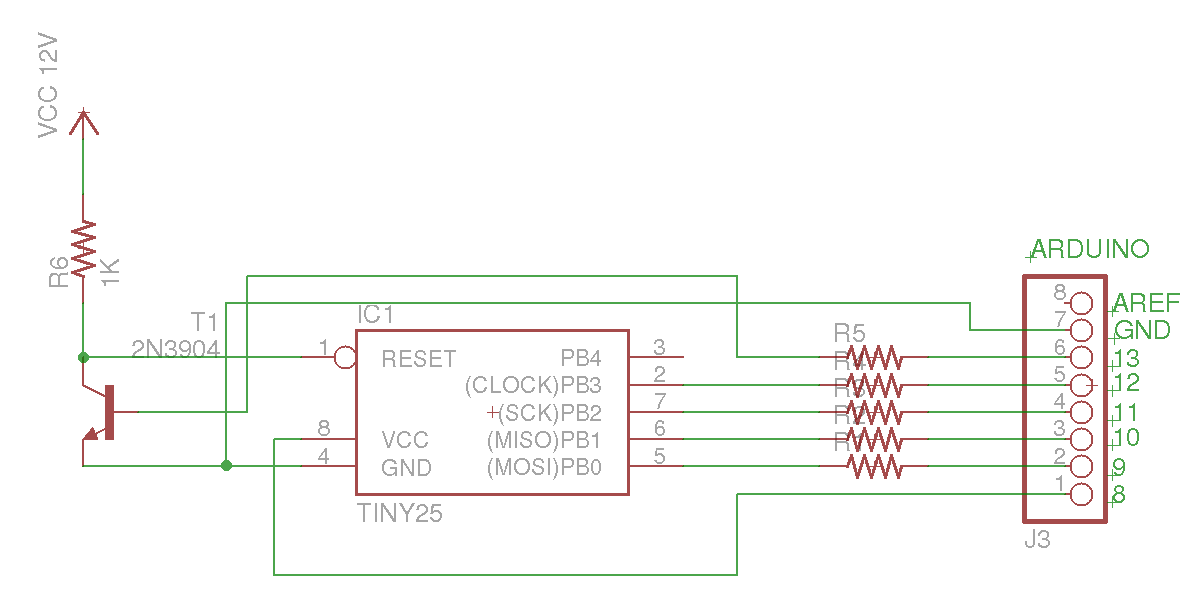
Click to enlarge
The Arduino is connected to the tiny though 1k resistors and a 2N3904 transistor is used to switch 12 volts applied to the tiny’s reset pin. After uploading the sketch the Arduino sends “Enter a character to continue.” repeatedly until communications are established by sending a byte through the serial monitor. The Arduino then programs the fuses.
Serial Monitor log
Enter a character to continue.
Enter a character to continue.
Enter a character to continue.
1
Entering programming Mode
lfuse reads as 62
hfuse reads as 5F
efuse reads as FF
Writing hfuse
Writing lfuse
lfuse reads as 62
hfuse reads as DF
efuse reads as FF
Exiting programming Mode
Download the program: hv_serial_prog.pde
Based on work by Jeff Keyzer.
Let me know if it works for you.
R1-R5 = x Ohm ?
R1-R5 = 1k Ohm
How important are resistors R1-R4? I see a few other circuits on the web that don’t include those and the programmer works fine without them.
R1-R4 are only needed to protect against incorrectly wired pins.
If you need a 5 to 12V converter then you can design your own at:
http://www.nomad.ee/micros/mc34063a/index.shtml
with the standard MC34063A controller.
Adding support for more Attinys ?
// Defaults for ATtiny13
HFUSE 0xFF
LFUSE 0x6A
Excelent AVR Programer
It works fine for me on a AtTiny45 ! Thank you so much.
I’ve tried on an AtTiny15 (default fuse value = 0x50) with some tweaks in the ARduino sketch but it keeps sending back 0xFF. Then I remembered that RB3 and RB4 pins on AtTiny15 are swapped compared to ATTiny25 (hell, the Atmel guy who did it deserves tar & feather).
So I rewired for Tiny15 and then… it doesn’t work either (the bricked AtTiny15 remains bricked).
Hobby it looks like the algorithm to enter the High-voltage programming mode is different on the AtTiny15 but the instructions to read and write the fuse bits are similar. I would first try commenting out read hfuse, read efuse, and write hfuse. Then try writing 0x5C instead of 0x50 as the fuse value. It appears the third and forth bits are part of the write instruction and need to be 1s. If that does not work try changing the sequence to enter programming mode to match the datasheet (page 56).
So i’ve build this thing and testet it with a bricked ATTiny13 : I works at the first time.
Use MAX662 to convert 5V into 12V. Needs only 2 capicators and no justage. DIL8 package.
http://datasheets.maximintegrated.com/en/ds/MAX662A.pdf
Is that the other chip on your shield? That’s pretty neat Michael.
For my shield i have use the usual and cheap MC34063. But you need an bunch of other components to build this.
I you don’t want to solder much the MAX 662 is a better solution although it is harder to get and much more expensive as the MC34063.
And:
If you use the MAX662 you don’t need T1 and R6 anymore. You can connect R5 to the shutdown input of this ic. (No need to modify the code.)
And the RESET input of the Attiny connects directly to the 12V output of the MAX662.
OK. You need a delay for minimal 400us after activating the programming voltage by your program to stabilize the 12V output of the MAX 662. (see data sheet).
The attinys want 12v coming on in 20µSec and the MAX662 takes 400µSec.
really still need the transistor..
Hi, I’ve recently done the stupid thing of setting the wrong fuses on my Attiny85. I only have a Teensy++2.0 to work with and I’m having a job trying to ‘convert’ the pins to work with this. Any help would be much appreciated. Thank you.
Here is my best guess studio,
Match up the green pin numbers on my connection diagram to the white silk screen numbers on your Teensy board as follows:
Arduino – Teensy++ 2.0
GND – GND
13 – C3
12 – C2
11 – C1
10 – C0
9 – E1
8 – +5v
Thank you for your reply.
In the meantime while I was waiting for my post to be moderated I jumped in the deep end and wired it up. It all worked perfectly. If it helps anyone else, I used a 2N2222A transistor and a 12v power pack from a cheap USB->SATA/IDE converter and connected it following the pin numbers in the schematic. I have saved my first tiny85 :D happy days.
I must admit I didn’t quite follow your post, are you indicating the connection pins between the Arduino and Teensy++ 2.0 or the equivalents between them? In my case I simply connected using the same Arduino pin numbers as the schematic and it worked perfectly.
Once you have a comment that contains your email that is approved, all subsequent comments that contain the same email will be posted immediately. See Comments Policy.
Thanks for helping others by posting of your experiences.
Glad to hear you got things working studio. I am indicating the equivalency between the Arduino pins on the schematic and the Teensy++ 2.0.
To be a little more clear:
Attiny85 pin 2 connects to Arduino pin 12 or in your case Teensy++ 2.0 pin C2.
Attiny85 pin 7 connects to Arduino pin 11 or in your case Teensy++ 2.0 pin C1.
etc.
Is this the way you wired it up? If not maybe a picture of the correct setup could help clear things up.
I am getting these pin mappings from this picture, http://www.pjrc.com/teensy/teensyduino.html and a table http://www.pjrc.com/teensy/td_digital.html
Hi,
I wanted to thank you for this excellent work and programmer, which I used successfully to revitalize two “broken” attiny45. For the 12 V source, I used directly (without regulation) a wall plug adapter which provided ~ 12.5 V. I also used a BC337 as a switch transistor instead of the 2N3904. Thanks again for sharing your work like this !
Glad to hear it worked for you Thierry. It looks like the absolute maximum rating for the reset pin is 13 volts if someone has an odd value transformer.
Hi,
Has anyone tried this on a bricked ATTiny2313?
Does the serial high-voltage programming mode program the SPIEN bits on the 2313?
Thanks
what happens if you exceed 13volts?
Thanks, this saved my butt
hey , would this work on other atmel chips like atmega specially atmega8 ?
thanks
ATtiny84 wiring require more pins to be connected to GND:
http://www.instructables.com/id/AVR-Attiny-fusebit-doctor-HVSP/step2/How-it-works/
I did it with an Attiny84 and it worked very well. I also read about the missing GND connections in the Datasheet.
But at first it didn’t work, simply because of some loose pin connection.
While I was searching for the Error I compared the Datasheets and it seems that the instruction sets for reading/writing the HIGH Fuse is different (The Attiny84 has some more fusebit settings), but luckily the Software isn’t depending on this and so I think almost every AVR with the High Voltage Programming feature should be programmable with this.
Thank you, I knew I was missing something.
Works like a dream.
An AVR is easily bricked while experimenting with the fuses. I fixed my ATtiny45 with your sketch. There is one gotcha though: the ‘Hello?’ is actually an invitation to the user to enter some key strokes, it is not the programmer being unable to see the ATtiny. I changed the text in my copy to ‘Enter a single character to continue …’.
BTW: to give other visitors an idea what components to select, here is what I used:
– 330E resistors for R1-R4 (limiting Arduino’s I/O-pin current to a safe 15mA)
– 4k7 for R5 (limiting base current to little under a safe 1mA)
– BC547B for T1 (most general purpose NPN will do)
– An old 12V laptop power supply (check output voltage before use)
Thnx for sharing unbricking tool :o)
Good point jippie, I’ll update it to say something more helpful than hello.
Bricked a tiny45 and tiny13 by setting /RESET to IO today.
Thankfully I found your post and with the help of an Arduino Nano I easily could resurrect them again.
Just had to change the default FUSE values.
Thanks a lot!
After bricking by ATTiny85 by setting it to 128KHz, I finally solved the problem by using a modified version of the ArduinoISP example sketch that uses slow software SPI. Was able to get it all the way down to 16KHz.
I rewrote the sketch to be a bit slicker, now it gives boot time and serial configuration of your Arduino-as-ISP (hardware SPI @ 125KHz, or fully configurable software SPI). Modified sketch can be found here:
http://pastebin.com/60xYhyq0
Not to be deterred by success, the next day I went on to brick the same ’85 by disabling the RESET pin.
Saved my butt. Thanks!
jj
Could you give me some insight to use your solution for microcontroleur programming (ATTiny85) not only rescuing. I whant to use RESET_PIN as IO_pin and download a sketch with high-voltage programming method.
High-voltage programming is not necessary in order to use the reset pin as an i/o pin. You can download a sketch and set the reset pin to i/o pin fuse using the normal programming method. If you need to make changes later on, then high-voltage programming is used to reset the fuses so the regular programmer can download the sketch again.
If you really want to use high-voltage serial programming to download a sketch then the instructions to implement a full blown programmer are documented in section 20.6 in the ATtiny85 datasheet. They could be implemented in a similar fashion to read and write fuse bit instructions in my sketch.
Very fine!
Thank you very, very much!
I built it as a shield. It works very good!
Frank
Hi!
Really great work! I have juste save my ATtiny13A!
But my problem wasn’t a fuse problem. I programmed a wrong clock prescaler so my programer won’t recognize the ATtiny cause of the too slow clock.
So I modified your sketch, I just add few lines to make an Chip Erase, and wait for SDO goes to high:
[…]
//Write lfuse
Serial.println(“Writing lfuse\n”);
shiftOut2(DATAOUT, INSTOUT, CLKOUT, MSBFIRST, 0x40, 0x4C);
shiftOut2(DATAOUT, INSTOUT, CLKOUT, MSBFIRST, LFUSE, 0x2C);
shiftOut2(DATAOUT, INSTOUT, CLKOUT, MSBFIRST, 0x00, 0x64);
shiftOut2(DATAOUT, INSTOUT, CLKOUT, MSBFIRST, 0x00, 0x6C);
//Erase device
Serial.println(“Erase device\n”);
shiftOut2(DATAOUT, INSTOUT, CLKOUT, MSBFIRST, 0x80, 0x4C);
shiftOut2(DATAOUT, INSTOUT, CLKOUT, MSBFIRST, 0x00, 0x64);
shiftOut2(DATAOUT, INSTOUT, CLKOUT, MSBFIRST, 0x00, 0x6C);
while (!digitalRead(DATAIN));
readFuses();
[…]
Thanks a lot!
Thank you, Moot! The extra erase cycles just saved an ATtiny13A that I had given up on. I had previously used this tool successfully with that chip, but then I accidentally flipped the high and low fuses and got into a cycle where every read and write was inconsistent, so I assume I too ended up setting the clock speed to zero and not being able to recover without the erase.
Thank you, Paul, for this useful post! I managed to salvage a bricked t45 from this;)
I was however wondering if it would be possible to apply this to an m328p chip? I have used the fuse bit calculator http://www.engbedded.com/fusecalc/ to get the default values as:
lfuse:0x62
hfuse:0xD9
efuse:0xFF
my question is this; “How do I implement this into your program?”
Thank you in advance
Jesper
Hi Jesper,
The m328p uses high-voltage parallel programming. There is an implementation you can use here: http://mightyohm.com/blog/2008/09/arduino-based-avr-high-voltage-programmer/
(Posted for Paul)
Thank you!
where is the code?
never mind. I feel stupid.
Search this page (CTRL-F) for the phrase “Download the program” and you’ll see the link.
Thanks for this post!
I accidentally programmed the RSTDISBL fuse on my ATtiny85. Your schematic + sketch worked great. Unlocked it in a second.
As a note, the resistors for the pins are only needed to protect your Arduino\ATiny against incorrectly wired pins. I didn’t use them and it worked fine. But you still need the resistors for the transistor base and collector rails! Don’t forget them.
IT WORKED!!!!!
I love you! you saved me a couple dollars. This is brilliant.
Thanks.
Bonjour,
Réalisation du montage suivant le schéma puis essai de programmation des fusibles sur un ATtiny85.
Cela a parfaitement fonctionné.
Merci
Hello,
Completion of installation and testing according to the scheme programming fuses on ATTINY85.
It worked perfectly.
Thank you
The serial monitor isn’t outputting anything after “Entering Programming Mode”, I don’t believe it is reading the fuses on my ATtiny85 properly. Any ideas? I checked the circuit multiple times, everything seems to be in order.
wonderful thank-you – worked first time
You will be happy to note that the process is still a great success here in late 2013.
Upgrading Windows to 8.1 provided some surprises when my USBASP programmer went astray. It hadn’t occurred to me sooner, but after several hours of trying to fix the ATTiny85, I dropped in a fresh one. It programmed, but on second upload, it also bricked. Then number 3 and 4 (while I was trying to get the programmer working right. ) I figured out what was happening, but exhausted my stock until your procedure came to the rescue.
Thanks.
Steve
Sorry without luck on ATTINY85 and original Arduino Uno R3:
Entering programming Mode
lfuse reads as FF
hfuse reads as FF
efuse reads as FF
Writing hfuse
Writing lfuse
lfuse reads as FF
hfuse reads as FF
efuse reads as FF
Exiting programming Mode
Got the same situation. I wonder if I can still recover from this. Any ideas?
The first thing I would check is all of your wiring, and the 12V source. Make sure you’re using the correct (i.e. an NPN) transistor. If you have an oscilloscope, place the probe on the target’s RESET pin and make sure it sees 12V when you run the sketch.
Another possibility: if the lock bits have been programmed, it is not possible to change fuses, even by HVSP.
To unlock the lock bits, a chip erase must be performed. The hv_serial_prog.pde sketch above doesn’t do this. To modify it, add the following into loop() immediately before the first call to readFuses();
// ———-begin———-
//Chip erase
if ((inByte == ‘e’) || (inByte == ‘E’)) {
Serial.println(“Erasing all memories…”);
shiftOut2(DATAOUT, INSTOUT, CLKOUT, MSBFIRST, 0x80, 0x4C);
shiftOut2(DATAOUT, INSTOUT, CLKOUT, MSBFIRST, 0x00, 0x64);
shiftOut2(DATAOUT, INSTOUT, CLKOUT, MSBFIRST, 0x00, 0x6C);
delay(100);
shiftOut2(DATAOUT, INSTOUT, CLKOUT, MSBFIRST, 0x00, 0x4C);
}
// ———-end————
Now when you run the sketch, press ‘e’ (or ‘E’) to also have the sketch perform a chip erase before restoring the fuses.
Got it to work! Don’t know what was wrong but I suspect the wiring plus a burned resistor on the transistor around the 12V. All is good now – thank you!
I had the same issue. In my case i misplaced the NPN transistor with B correct but C and E swapped. Once i put transistor correctly, it worked perfectly! Just sharing if anybody does same error as mine! Thanks a lot for sharing this, it unbricked one AtTiny45 for me! :-)
The first thing I would check is all of your wiring, and the 12V source. Make sure you’re using the correct (i.e. an NPN) transistor. If you have an oscilloscope, place the probe on the target’s RESET pin and make sure it sees 12V when you run the sketch.
Another possibility: if the lock bits have been programmed, it is not possible to change fuses, even by HVSP.
To unlock the lock bits, a chip erase must be performed. The hv_serial_prog.pde sketch above doesn’t do this. To modify it, add the following into loop() immediately before the first call to readFuses();
// ———-begin———-
//Chip erase
if ((inByte == ‘e’) || (inByte == ‘E’)) {
Serial.println(“Erasing all memories…”);
shiftOut2(DATAOUT, INSTOUT, CLKOUT, MSBFIRST, 0x80, 0x4C);
shiftOut2(DATAOUT, INSTOUT, CLKOUT, MSBFIRST, 0x00, 0x64);
shiftOut2(DATAOUT, INSTOUT, CLKOUT, MSBFIRST, 0x00, 0x6C);
delay(100);
shiftOut2(DATAOUT, INSTOUT, CLKOUT, MSBFIRST, 0x00, 0x4C);
}
// ———-end————
Now when you run the sketch, press ‘e’ (or ‘E’) to also have the sketch perform a chip erase before restoring the fuses.
Note:
The web software seems to convert single quotes and double quotes into their pair-matched (i.e. left-quote and right-quote) UTF-8 equivalents. On my system the Arduino IDE didn’t like that. After pasting the above code into your sketch you may need to manually edit (i.e. delete and re-type) the single- and double-quotes.
I would love to hear suggestions for both Alex’s and Radius’ questions as I have been experiencing both of these issues.
Sorry, adding email notify
In both case, (all fuses being read as FF, or no activity after “Entering Programming mode) seems to me to suggest a problem with the wiring to DATAIN (pin 11 on the Arduino, pin 7 on the target).
Hi Paul,
Do the arduino serial examples work for you?
If you mean the hv_serial_prog.pde sketch linked above, yes. It has been a while though, I can’t say with 100% certainty whether or not I needed to modify the sketch in any way.
They certainly seem to, but always return before and after fuses of FF on all fuses. I have some new parts coming this week so I will try them. I used old parts and some were alternate parts, so I’ll wait on building a new one. Thanks for the awesome solution, regardless.
Paul
Ah! I was confused by the two Pauls! ;)
Paul A,
If you’re seeing FF for all fuses, it means that pin 11 on your Arduino is always reading high. This probably means that pin 11 on your Arduino is not properly connected to pin 7 on the target, although that is not the only explanation. Bottom line though is that it has to be a circuit problem, or a completely dead AVR (which I have never actually seen… they are pretty tough little chips).
– Double-check all the connections (are you doing this on a breadboard?)
– Make sure you’ve got the right kind of transistor (almost any NPN will do, 2N2222, etc.)
– Confirm all of the resistors are the correct value, although the only critical one is the one between the transistor and the 12V source.
– Confirm that your 12V source is in fact 12V. This really has to be either a 12V regulated supply, or a 12V battery.
The voltage MUST be between 11.5V and 12.5V, and be ‘clean’ i.e. no ripple. Do you have an oscilloscope to check it? You should know that most cheap 12V ‘wall-warts’ will likely deliver more like 16V when idling. Many don’t even have filtering of any kind, so will cycle between 0V and 17V, 60 or 120 times per second. These won’t do.
Thanks for the advice. I am using a wall wart, but have it running through a 12v regulator and a 100uF cap to clean it up and it seems smooth at 11.7v.
I am trying to unbrick an attiny84 though, not a 25, so I may need to take another look at the datasheet for that and make sure my connections are good.
Paul A.
[EDIT]
OK, got it. CLOCK on ATT25 is PORTB3 but on ATT84 it is PB0. Once I moved the jumper wire to the correct pin I got:
Entering programming Mode
lfuse reads as C1
hfuse reads as DF
efuse reads as FF
Writing hfuse
Writing lfuse
lfuse reads as 62
hfuse reads as DF
efuse reads as FF
Exiting programming Mode
…and I know I should be getting 62/FF for lf/hf so I know I’m good now.
Thanks for the help guys!
Thanks a lot! Worked like a charm.
As an Attiny-starter I already bricked few Attiny85’s in attempt to set them to 128kHz-mode, which seems to make them un-programmable with Olimex AVR-ISP-mk2, I got them revived with this!
https://www.dropbox.com/s/bs5bx47p6p5fwxh/_20140323_213113.JPG
Although I used B547 because I didn’t have anything else at hand, but it seemed to work just fine.
HVSP is always an option, but be aware that your specific issue could have been solved by using a slower programming clock speed.
ISP on an AVR requires that SCK (the programming clock) be < 1/4 of the target's clock speed. If you fused your '85 for 128 kHz, then you need a programming clock of < 32 kHz. If you left CKDIV8 programmed, you'd need < 4 kHz.
I guess you're using avrdude with your Olimex AVR-ISP-mk2. You can reduce the programming clock speed by using the -B option. The default is a 1 microsecond bit-time, giving a 1 MHz clock.
To set a < 32 kHz clock, you need about a 32 microsecond bit-time. Try -B 35
To set a < 4 kHz clock, you need a bout a 250 microsecond bit-time. Try -B 300
I've not used the Olimex AVR-ISP-mk2, it may not support use of -B. You could try -i instead with the same bit-time.
Thanks, you’re correct, it seems that -B 35 and -B 300 also work.
Although, I still had use for HVSP because in one project I accidentally exchanged lfuse and hfuse and tried with few Attinys before realising :)
Fortunately I was saved with this again!
Please add into your schetch, before writing Hfuse
//Chip erase
Serial.println(“Erasing chip”);
shiftOut2(DATAOUT, INSTOUT, CLKOUT, MSBFIRST, 0x80, 0x4C);
shiftOut2(DATAOUT, INSTOUT, CLKOUT, MSBFIRST, 0x00, 0x64);
shiftOut2(DATAOUT, INSTOUT, CLKOUT, MSBFIRST, 0x00, 0x6C);
If the lock fuses are enabled you cannot write fusebits without chip erase
Thanks for the resource, I am new to electronics, so am I correct in assuming that the 12v source’s GND is common to the Arduino too?
Can I ask what you guys are using to program your chips? I’m building some micro-drones as part of a wireless mobile sensor network, but cannot get anything onto the chips, using an Arduino as programmer. Has anyone successfully used an Arduino, and if so can you post your setup? Thanks to this blog I have learnt so much about these tiny monsters. :0)
The ArduinoISP sketch should work just fine. What are the symptoms you’re seeing?
After reading a bunch of related posts, I bought a programmer from MikroElectronica and that does the job just fine.
I cannot connect it directly to the Arduino IDE, but I can use AVRFlash to push the hex to the chip once written from Arduino.
One oddity I did notice though was that if I put the blink script on the chip, the delay time is increased by a factor of 10.
Clock settings?
I’d guess more like a factor of 8. Maybe 16.
New AVR ship configured to run at 1 MHz from the 8 MHz internal oscillator via the CKDIV8 fuse. I’d guess that you’ve got your Arduino IDE expecting a ‘board’ running at 8 MHz or 16 MHz. Check ‘Board’ under ‘Tools’.
Thanks Joey, that makes perfect sense. I will tweak my tests.
Paul
Is it working on a Attiny861 ?
Has someone tested ?
Unfortunately, the ATtiny861 doesn’t support HVSP (high voltage serial programming). If you’ve programmed the wrong fuses and are no longer able to reach your ‘861 with a normal ISP programmer, then you’ll need a programmer capable of HVPP (high voltage parallel programming).
This is possible with with an Arduino, but it is somewhat more complicated. Do a Google search for Arduino HVPP. The author Paul mentions one of the resulting links earlier in this page of comments. That link is:
http://mightyohm.com/blog/2008/09/arduino-based-avr-high-voltage-programmer/
You may not need HVPP. Depending on which fuses you’ve programmed into the ‘861, there may be much simpler ways to recover. Really the only ‘killer’ fuse is RSTDISBL. If you’ve programmed that, there is no alternative but HVPP. DWEN is also troublesome, but there are recovery methods which don’t require HVPP.
If you’ve fused for an external clock source, or a low-frequency clock source, recovery may only require that you provide such a clock.
You can find a version of ArduinoISP modified to provide an external clock here:
http://www.avrfreaks.net/index.php?name=PNphpBB2&file=viewtopic&p=1035693#1035693
An excellent tutorial on recovering from ‘fuse accidents’ is here:
http://www.avrfreaks.net/index.php?name=PNphpBB2&file=viewtopic&t=106325&start=all&postdays=0&postorder=asc
Thank you very much for your quickest answer.
I don’t know what happend with my Attiny861.
After programming with PonyProg2000, i can’t recognize it, and i don’t know what to do.
I tried with this method (arduino HVSP), but with no success.
Thank you!
Hi there
Could someone please explain where I messed up here and provide a solution for me ?
All worked like a charm regarding programming …Thanks Joey!
Initially i used this line to make use of my reset pin on an ATTINY85
avrdude -P COM15 -b 19200 -c avrisp -p attiny85 -v -e -U lfuse:w:0xE2:m -U hfuse:w:0x5F:m -U efuse:w:0xFF:m -U flash:w:85v1.cpp.hex
THEN to recover the RESET pin I used the solution mentioned on this page..which worked as I can now re-program my ATTINY85.
The only problem is I now have things working 8X (8 TIMES) SLOWER.
So a delay(1000); actually ends up being 8 seconds long …eeeek!
How do I solve this issue ?
Please help
Joe44
Set the correct fusebits value. You compiled the hex for internat 8 MHz clock, but you set the fusebits at internal 1 Mhz Clock http://www.engbedded.com/fusecalc
(The avatar is of Rickety, not Joey)
You’ve fused your ATtiny85 with the default fuse settings, which includes the fuse CKDIV8. This fuse causes the device to run with a system clock prescaler of 8 by preloading the CLKPR register after a reset.
You can either unprogram CKDKIV8, or load the CLKPR register with the correct sequence to restore to a prescaler of 1.
The default low fuse is 0x62. To unprogram CKDIV8 without changing anything else, write the low fuse as 0xE2.
If instead you want to change CLKPR from your program, include the following code early in your program:
CLKPR = (1<<CLKPCE);
CLKPR = 0;
The first line enables a change to the prescaler, while the second line changes the prescaler to 1.
Make sure interrupts are disabled during those two lines.
I used your code and instructions to get back a bricked Tiny85 the other day. I simplified things a bit, though, since I just had a one-off to do.
I wired pins 2, 5, 6, and 7 to the same Uno pins (without the series resistors), wired 4 and 8 to ground and +5 from the Uno, and then took 12 volts from my bench supply and just applied that to pin 1 – no switching.
From reading the other comments it appears that perhaps there is a more sophisticated dance involving the +12 required for some parts. But in my case, it just worked. I did make sure that the +5 supply was active both before and after the +12 volts.
Hi, I want to thank you, yesterday I bricked 3 attiny85’s (playing with V-usb and bootloaders) and thanks to you, they are all working again! First it didn’t want to work, but then I noticed that I used 10k resistor as R6 instead of 1k (bad light, orange and red colour). When I replaced it, it worked as a charm. And I don’t have 2N3904 so I used BC548 without problems.
I’ve built a small wing shield for this. Open hardware of course. Thanks for the inspiration!
https://github.com/gzip/eagle-hvsp-wing-shield
You are great!!
Work like a charm!
work perfectly on my bricked attiny 85
Any tips on adopting this to Unbick Atmega328p smd chip? :) It’s already soldered but I have access to almost all pins via headers…
The 328P doesn’t support HVSP, but does support HVPP (high voltage parallel programming). It is mentioned earlier in the comments on this page, along with this link:
http://mightyohm.com/blog/2008/09/arduino-based-avr-high-voltage-programmer/
Requires about 20 pins, and can’t really be done in circuit as a result.
I think I found a way to do this. It does require desoldering SMD chip (which is easy with hot air), Mighty Ohm’s HV rescue programmer and TQFP32 to DIP28 Socket Programmer Adapter. Adapter is the key as it allows access to all pins of SMD chip without soldering it. I ordered both. I’m just not going to solder DIP socket to HV rescue programmer, but instead solder female headers so i can insert TQFP32 to DIP28 socket. If I need to program actual DIP ATMega chip I can always make quick adapter from .1″ header to IC socket on piece of perfboard.
The Atmega328p uses high-voltage parallel programming. There is an implementation you can use here: http://mightyohm.com/blog/2008/09/arduino-based-avr-high-voltage-programmer/
Wow! Just saved me a handful of 13a’s. I’m indebted!! Seriously!
NEED first begin FF FF !
………..
//Programming mode
readFuses();
Serial.println(“Writing hfuse lfuse FF FF”);
shiftOut2(DATAOUT, INSTOUT, CLKOUT, MSBFIRST, 0x40, 0x4C);
shiftOut2(DATAOUT, INSTOUT, CLKOUT, MSBFIRST, 0xFF, 0x2C);
shiftOut2(DATAOUT, INSTOUT, CLKOUT, MSBFIRST, 0x00, 0x74);
shiftOut2(DATAOUT, INSTOUT, CLKOUT, MSBFIRST, 0x00, 0x7C);
shiftOut2(DATAOUT, INSTOUT, CLKOUT, MSBFIRST, 0x40, 0x4C);
shiftOut2(DATAOUT, INSTOUT, CLKOUT, MSBFIRST, 0xFF, 0x2C);
shiftOut2(DATAOUT, INSTOUT, CLKOUT, MSBFIRST, 0x00, 0x64);
shiftOut2(DATAOUT, INSTOUT, CLKOUT, MSBFIRST, 0x00, 0x6C);
readFuses();
//Write hfuse
…………….
for ATtiny13 made in china of ebay.com
// AVR High-voltage Serial Programmer
// Originally created by Paul Willoughby 03/20/2010
// http://www.rickety.us/2010/03/arduino-avr-high-voltage-serial-programmer/
// Inspired by Jeff Keyzer http://mightyohm.com
// Serial Programming routines from ATtiny25/45/85 datasheet
// Desired fuse configuration
//#define HFUSE 0xDF // Defaults for ATtiny25/45/85 DF 62
//#define LFUSE 0x62
#define HFUSE 0xFF // Defaults for ATtiny13 6A FF
#define LFUSE 0x6A
#define RST 13 // Output to level shifter for !RESET from transistor to Pin 1
#define CLKOUT 12 // Connect to Serial Clock Input (SCI) Pin 2
#define DATAIN 11 // Connect to Serial Data Output (SDO) Pin 7
#define INSTOUT 10 // Connect to Serial Instruction Input (SII) Pin 6
#define DATAOUT 9 // Connect to Serial Data Input (SDI) Pin 5
#define VCC 8 // Connect to VCC Pin 8
int inByte = 0; // incoming serial byte Computer
int inData = 0; // incoming serial byte AVR
void setup()
{
// Set up control lines for HV parallel programming
pinMode(VCC, OUTPUT);
pinMode(RST, OUTPUT);
pinMode(DATAOUT, OUTPUT);
pinMode(INSTOUT, OUTPUT);
pinMode(CLKOUT, OUTPUT);
pinMode(DATAIN, OUTPUT); // configured as input when in programming mode
// Initialize output pins as needed
digitalWrite(RST, HIGH); // Level shifter is inverting, this shuts off 12V
// start serial port at 9600 bps:
Serial.begin(19200);
establishContact(); // send a byte to establish contact until receiver responds
}
void loop()
{
// if we get a valid byte, run:
if (Serial.available() > 0) {
// get incoming byte:
inByte = Serial.read();
Serial.println(byte(inByte));
Serial.println(“Entering programming Mode\n”);
// Initialize pins to enter programming mode
pinMode(DATAIN, OUTPUT); //Temporary
digitalWrite(DATAOUT, LOW);
digitalWrite(INSTOUT, LOW);
digitalWrite(DATAIN, LOW);
digitalWrite(RST, HIGH); // Level shifter is inverting, this shuts off 12V
// Enter High-voltage Serial programming mode
digitalWrite(VCC, HIGH); // Apply VCC to start programming process
delayMicroseconds(20);
digitalWrite(RST, LOW); //Turn on 12v
delayMicroseconds(10);
pinMode(DATAIN, INPUT); //Release DATAIN
delayMicroseconds(300);
//Programming mode
readFuses();
Serial.println(“Writing hfuse lfuse FF FF”);
shiftOut2(DATAOUT, INSTOUT, CLKOUT, MSBFIRST, 0x40, 0x4C);
shiftOut2(DATAOUT, INSTOUT, CLKOUT, MSBFIRST, 0xFF, 0x2C);
shiftOut2(DATAOUT, INSTOUT, CLKOUT, MSBFIRST, 0x00, 0x74);
shiftOut2(DATAOUT, INSTOUT, CLKOUT, MSBFIRST, 0x00, 0x7C);
shiftOut2(DATAOUT, INSTOUT, CLKOUT, MSBFIRST, 0x40, 0x4C);
shiftOut2(DATAOUT, INSTOUT, CLKOUT, MSBFIRST, 0xFF, 0x2C);
shiftOut2(DATAOUT, INSTOUT, CLKOUT, MSBFIRST, 0x00, 0x64);
shiftOut2(DATAOUT, INSTOUT, CLKOUT, MSBFIRST, 0x00, 0x6C);
readFuses();
//Write hfuse
Serial.println(“Writing hfuse”);
shiftOut2(DATAOUT, INSTOUT, CLKOUT, MSBFIRST, 0x40, 0x4C);
shiftOut2(DATAOUT, INSTOUT, CLKOUT, MSBFIRST, HFUSE, 0x2C);
shiftOut2(DATAOUT, INSTOUT, CLKOUT, MSBFIRST, 0x00, 0x74);
shiftOut2(DATAOUT, INSTOUT, CLKOUT, MSBFIRST, 0x00, 0x7C);
//Write lfuse
Serial.println(“Writing lfuse\n”);
shiftOut2(DATAOUT, INSTOUT, CLKOUT, MSBFIRST, 0x40, 0x4C);
shiftOut2(DATAOUT, INSTOUT, CLKOUT, MSBFIRST, LFUSE, 0x2C);
shiftOut2(DATAOUT, INSTOUT, CLKOUT, MSBFIRST, 0x00, 0x64);
shiftOut2(DATAOUT, INSTOUT, CLKOUT, MSBFIRST, 0x00, 0x6C);
readFuses();
//Write lfuse
/*Serial.println(“Writing lfuse\n”);
shiftOut2(DATAOUT, INSTOUT, CLKOUT, MSBFIRST, 0x40, 0x4C);
shiftOut2(DATAOUT, INSTOUT, CLKOUT, MSBFIRST, LFUSE, 0x2C);
shiftOut2(DATAOUT, INSTOUT, CLKOUT, MSBFIRST, 0x00, 0x64);
shiftOut2(DATAOUT, INSTOUT, CLKOUT, MSBFIRST, 0x00, 0x6C);
*/
//Erase device
Serial.println(“Erase device\n”);
shiftOut2(DATAOUT, INSTOUT, CLKOUT, MSBFIRST, 0x80, 0x4C);
shiftOut2(DATAOUT, INSTOUT, CLKOUT, MSBFIRST, 0x00, 0x64);
shiftOut2(DATAOUT, INSTOUT, CLKOUT, MSBFIRST, 0x00, 0x6C);
while (!digitalRead(DATAIN));
readFuses();
Serial.println(“Exiting programming Mode\n”);
digitalWrite(CLKOUT, LOW);
digitalWrite(VCC, LOW);
digitalWrite(RST, HIGH); //Turn off 12v
}
}
void establishContact() {
while (Serial.available() <= 0) {
Serial.println("press SPACE and ENTER "); // send an initial string
delay(1000);
}
}
int shiftOut2(uint8_t dataPin, uint8_t dataPin1, uint8_t clockPin, uint8_t bitOrder, byte val, byte val1)
{
int i;
int inBits = 0;
//Wait until DATAIN goes high
while (!digitalRead(DATAIN));
//Start bit
digitalWrite(DATAOUT, LOW);
digitalWrite(INSTOUT, LOW);
digitalWrite(clockPin, HIGH);
digitalWrite(clockPin, LOW);
for (i = 0; i < 8; i++) {
if (bitOrder == LSBFIRST) {
digitalWrite(dataPin, !!(val & (1 << i)));
digitalWrite(dataPin1, !!(val1 & (1 << i)));
}
else {
digitalWrite(dataPin, !!(val & (1 << (7 – i))));
digitalWrite(dataPin1, !!(val1 & (1 << (7 – i))));
}
inBits <<=1;
inBits |= digitalRead(DATAIN);
digitalWrite(clockPin, HIGH);
digitalWrite(clockPin, LOW);
}
//End bits
digitalWrite(DATAOUT, LOW);
digitalWrite(INSTOUT, LOW);
digitalWrite(clockPin, HIGH);
digitalWrite(clockPin, LOW);
digitalWrite(clockPin, HIGH);
digitalWrite(clockPin, LOW);
return inBits;
}
void readFuses(){
//Read lfuse
shiftOut2(DATAOUT, INSTOUT, CLKOUT, MSBFIRST, 0x04, 0x4C);
shiftOut2(DATAOUT, INSTOUT, CLKOUT, MSBFIRST, 0x00, 0x68);
inData = shiftOut2(DATAOUT, INSTOUT, CLKOUT, MSBFIRST, 0x00, 0x6C);
Serial.print("lfuse reads as ");
Serial.println(inData, HEX);
//Read hfuse
shiftOut2(DATAOUT, INSTOUT, CLKOUT, MSBFIRST, 0x04, 0x4C);
shiftOut2(DATAOUT, INSTOUT, CLKOUT, MSBFIRST, 0x00, 0x7A);
inData = shiftOut2(DATAOUT, INSTOUT, CLKOUT, MSBFIRST, 0x00, 0x7E);
Serial.print("hfuse reads as ");
Serial.println(inData, HEX);
//Read efuse
shiftOut2(DATAOUT, INSTOUT, CLKOUT, MSBFIRST, 0x04, 0x4C);
shiftOut2(DATAOUT, INSTOUT, CLKOUT, MSBFIRST, 0x00, 0x6A);
inData = shiftOut2(DATAOUT, INSTOUT, CLKOUT, MSBFIRST, 0x00, 0x6E);
Serial.print("efuse reads as ");
Serial.println(inData, HEX);
Serial.println();
}
By uploading this sketch to reset the fuses, will the erase what has been previously coded on the attiny?
Changing LFUSE and HFUSE both to 0xFF is not only unnecessary, it is not a good idea.
In so doing, you are unprogramming SPIEN, making it impossible to program over ISP.
You are also writing an unsupported value into SUT[1:0].
Why do you suggest this is required?
Used a slightly different program (also inspired by Jos Keyzer) and it worked great. If you need a 12 Volt source, consider this cheap little converter http://www.aliexpress.com/item/New-5W-5V-To-12V-USB-Step-Up-Boost-Module-Power-Supply-Better-US12/32273656554.html
my Attiny revived thanks !